Sunday, 4 March 2018

HIPAA Breach Report for March 2018

hipaa breach reporting, hipaa breach, hipaa, reporting

The Paubox Breach Report analyzed HIPAA breach reporting submitted to the U.S. Department of Health & Human Services (HHS) in February to analyze the types of breaches of unsecured protected health information (PHI) affecting 500 or more people.

HIPAA Breaches Ranked by People Affected

Paubox HIPAA Breach Report: March 2018 - Breaches Ranked by People Affected

Top Three Breach Types

  • Paper/Films breaches ranked the highest with 117,873 people’s PHI hacked or stolen in February. This is the first time we’ve seen Paper/Films take the top spot since we started compiling the HIPAA Breach Report back in July 2017.
  • Email breaches ranked second with PHI of 8,451 people breached. For the second month in a row, Email retained its #2 rank in this category.
  • Network Server breaches came in a relatively close third with 6,550 people having their PHI breached.

Bottom Three Breach Types

  • Other ranked as the lowest number of people’s PHI being breached in February with 2,204 breaches.
  • Desktop Computer was the second lowest type of breach as ranked by people affected with 5,257.

HIPAA Breaches Ranked by Occurrence

Paubox HIPAA Breach Report: March 2018 - Breaches Ranked by Occurrence

The Most Common

  • Paper/Films, Other, and Desktop Computer all tied for first as the most common breach types in February with 3 reported breaches each.
  • Email came in as the second most common breach type with 2 incidents.
  • Network Server came in last for third with 1 reported breach in February.

Takeaways

Paper/Films took the dubious top spot as the highest ranking breach vector for people’s PHI to get stolen or lost in February 2018.

Email ranked second for both HIPAA breaches ranked by people affected and for breaches ranked by occurrence. This is the second consecutive month Email has ranked second in both categories.

Full Data

Click here to download the raw data.

About the Paubox HIPAA Breach Report

The Paubox HIPAA Breach Report analyzes breaches that affected 500 or more individuals as reported in the HHS Wall of Shame in February 2018.

Minimize the risk of email getting you on the list with Paubox Encrypted Email. Start your free trial today.

Saturday, 3 March 2018

Atrium 100th Client Party (With Video)

Justin Kan, Hoala Greevy - Atrium 100th Client Party (With Video) - Paubox
Selfie with Atrium CEO and internet cornerstone Justin Kan

It’s taken three years living here, but Silicon Valley is starting to reveal to me how connected it is.

Take today for example: I get an email from Tirto Adji (an investor in Paubox) recommending I attend a networking event this evening in San Francisco. The event RSVP system was powered by Splash, whose CEO Ben Hindman I had seen nearly jump out of his shoes at SaaStr last month at SaaStr Annual.

I skimmed the details, clicked the RSVP link, added it to my HIPAA compliant calendar, and got back to work.

Upon arriving, I still had no idea what exactly Atrium was up to or who founded it. Thankfully one of their newer software engineers, Avi Moondra, struck up a convo with me and things fell into place.

Turns out Atrium was founded by none other than Justin Kan, whom I had also blogged about at last month’s SaaStr conference.

SEE ALSO: SaaStr 2018: Justin Kan – Why I Now Love B2B More Than B2C

When I spoke to Justin a few minutes later, I confirmed we have a mutual Hawaii friend in common, Doug Shimokawa. Along with Michael Seibel of Y Combinator, they went to Yale together as undergrads.

Man, small world.

Enjoy the pics and video from tonight’s event.

Congrats to Atrium on their 100+ clients in under six months!


Atrium had 119 clients by the time the party started
Atrium 100th Client Party (With Video) - Paubox
Atrium arranged an impressive taco bar spread
Atrium 100th Client Party (With Video)
Atrium client California Dreamin’: First time I’ve seen a Cannabis-infused beverage
Atrium 100th Client Party (With Video)
Atrium client Morning Recovery: Best served before you get after it
Atrium 100th Client Party (With Video)

About Atrium

Justin Kan stood on a chair

Atrium builds technology that lets lawyers provide exceptional legal service better and faster. They accomplish that as a team of engineers, designers and lawyers working on legal products for high growth technology companies.

In a nutshell, Atrium provides a better experience for legal clients than they previously thought possible: increasing communication, accuracy, and speed of service.

Thursday, 1 March 2018

Paubox SECURE 2018 is Coming, Do You Have a Topic To Share?

Surviving a HIPAA Audit - A Fireside Chat with Bluegrass Biggs - Paubox SECURE Conference

The inaugural Paubox SECURE conference was a great success last year, and we’re ready to do it again in 2018!

This November we’ll be welcoming leaders in healthcare, cybersecurity and innovation to San Francisco to once again discuss the challenges, solutions and innovation happening in IT security.

We’re looking for potential topics and speakers for Paubox SECURE 2018. If you’d like to submit a topic or know someone who should – submit your proposal here.

Can I use Google Hangouts Chat and be HIPAA Compliant?

Can I use Google Hangouts Chat and be HIPAA Compliant? - Paubox

It was announced today that Google’s Slack competitor, Hangouts Chat, came out of beta.

Hangouts Chat is Google’s take on modern workplace communication and is now available as a core part of G Suite. The natural question then arises, is Google Hangouts Chat HIPAA compliant?

We know the HIPAA industry is vast so we can empathize with just how many people need to use cloud services in this sector.

In previous posts, we’ve covered the following cloud solutions and their capabilities for HIPAA compliance:

Today, we will determine if Google Hangouts Chat offers HIPAA compliant service or not.

SEE ALSO: HIPAA Breaches and Cloud Providers

About Google Hangouts Chat

Google Hangouts Chat is a messaging platform built for teams. In essence, Hangouts Chat is Google’s competitive rebuttal to Slack and Microsoft Teams.

Google Hangouts Chat and the Business Associate Agreement

We’ve previously talked about how a Business Associate Agreement is a written contract between a Covered Entity and a Business Associate. It is required by law for HIPAA compliance.

We checked Google and found a page called HIPAA Compliance with G Suite.

On that page, Google states:

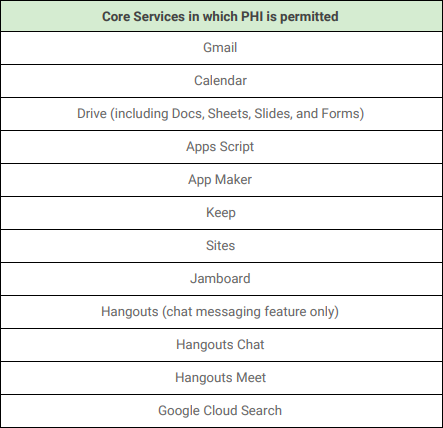
Google offers a BAA covering Gmail, Google Calendar, Google Drive (including Docs, Sheets, Slides, and Forms), Google Hangouts (chat messaging feature only), Hangouts Meet, Google Keep, Google Cloud Search, Google Sites, Jamboard, and Google Vault services.

Does Google Hangouts Chat Offer HIPAA Compliant Service?

The Business Associate Agreement is a key component to HIPAA compliance between a covered entity and a business associate.

While Google does offer to sign a BAA with covered entities and business associates, it does not cover their entire G Suite product line.

In other words, the Google BAA only includes coverage for certain services in G Suite.

We can see evidence of this on pages 4 & 5 of the HIPAA Compliance with G Suite guide.

Can I use Google Hangouts Chat and be HIPAA Compliant? - Paubox

Can I use Google Hangouts Chat and be HIPAA Compliant? - Paubox

Conclusion: Google Hangouts Chat is HIPAA compliant.

While it’s quite confusing (as of today), it should be noted that certain services within Google Hangouts are not HIPAA compliant. Those services are: Video Chat, SMS and VOIP components of Google Hangouts.

SEE ALSO: Is Google Hangouts HIPAA Compliant?

Monday, 26 February 2018

How to Undo A Sent Email in Microsoft Office 365 (With Pictures)

We’ve all accidentally sent an email too early, without a specific attachment, or to the wrong address.

Regardless of how it happened, an accidental email can make you seem too eager, too rushed, or worse: make you violate HIPAA. Sending protected health information (PHI) accidentally or to the wrong recipient (don’t always trust auto-fill!) is one of the most common causes for data breaches.

Luckily, there is a free and easy way to undo a sent email. Anyone can set it up, and we’re going to show you how.

We’ve looked at how to undo sent emails in other email providers:

This post will cover how to undo a sent email in Office 365.

Recall an Office 365 email with undo send

In every Office 365 account, you can opt in to an undo send feature. This free feature allows you to retract an email for up to 30 seconds after you have sent it.

How to enable undo send on your computer

1. First, sign into Office 365 and select the Settings gear icon at the top right hand corner of the page.

office 365 settings gear button

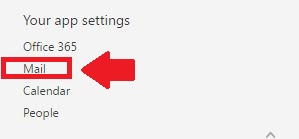
2. Scroll towards the bottom of the Settings page until you reach “Your app settings”. Select “Mail”.

office 365 settings, office 365 your app settings,

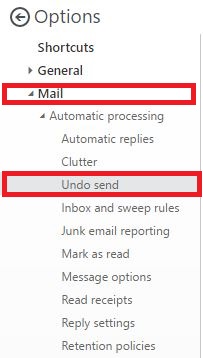
3. After you click on “Mail”, you will be brought to the “Options” page. Click the “Mail” option again, then find “Undo send.”

office 365 undo send

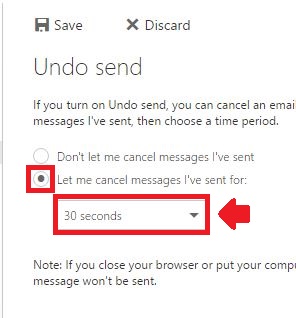
4. After selecting “Undo send”, you’ll be brought to the Undo send menu. Choose “Let me cancel messages I’ve sent for”, and then choose how long or short you want to be able to undo a sent email in the drop down menu. Once done, select “Save.”

undo send menu, office 365 undo send menu

How “undo send” works in Microsoft Office 365 

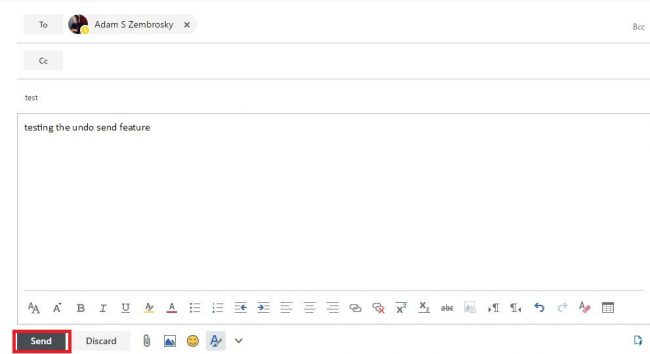
To see the “undo send” feature in action, first compose an email and send it as you normally would.

office 365 undo send test email

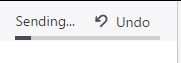
After you hit send, look at the top right part of your screen. You’ll notice a progress bar in action. The bar will run for as long as you gave yourself time to “Undo send” an email.

In order to recall the email, simply press “Undo”.

microsoft office 365 undo send feature email

Your recalled email will re-appear in a separate window for you to either edit as necessary or cancel it altogether.

However, you only get one second chance in Office 365. If you hit send after editing your email in the separate window, you won’t see the “Undo email” option again. Be sure to review your email contents and who you’re sending it to carefully!

Prevent accidental emails even further with Email Data Loss Prevention (DLP)

Even with an undo send feature enabled, you can still miss the window to retract your email. And it happens – we’re only human.

With our Email DLP Suite, you can make sure no emails – especially those containing sensitive information – slip through the cracks.

Email DLP allows you to set customizable rules so no sensitive data gets sent accidentally or maliciously. Social security numbers, proprietary information, PHI, and more can be recognized and “quarantined” from being sent out until you give the final approval.

Accidents happen, and it’s always better to be safe than sorry.

Sunday, 25 February 2018

What is HITRUST Certification?

What is HITRUST Certification? - Paubox

The Health Information Trust Alliance (HITRUST) is a standards development organization that was founded in 2007. It develops and maintains a healthcare compliance framework called the HITRUST Common Security Framework (CSF).

According to HITRUST, the CSF is:


“A certifiable framework that provides organizations with a comprehensive, flexible and efficient approach to regulatory compliance and risk management.

Developed in collaboration with healthcare and information security professionals, the HITRUST CSF rationalizes healthcare-relevant regulations and standards into a single overarching security framework. Because the HITRUST CSF is both risk- and compliance-based, organizations can tailor the security control baselines based on a variety of factors including organization type, size, systems, and regulatory requirements.”


The HITRUST CSF is designed to unify security controls from federal law (HIPAA), state law, and non-governmental frameworks (PCI-DSS) into a single framework that’s tailored towards use in the healthcare industry.

To become HITRUST certified, organizations typically follow a 4-step process:

  1. Leverage the HITRUST CSF assessment tool to identify applicable HITRUST Controls
  2. Complete HITRUST CSF assessment and engage a third-party HITRUST auditor to test controls
  3. Organization and auditor both submit their assessment to HITRUST for review via the MyCSF Portal
  4. Achieve HITRUST certification

Amazon Web Services (AWS) and HITRUST

If you are a cloud software company like Paubox, choosing the right cloud vendor for compliance and security is vitally important. As such, Paubox has been a customer with Amazon Web Services (AWS) since day one.

To address security and compliance, AWS uses a Shared Responsibility Model.

Under this model, AWS manages security of the Cloud and its underlying infrastructure, while security in the Cloud is the responsibility of the customer.

AWS customers have a broad range of controls to implement to protect content, platform, applications, systems and networks.

In the context of compliance, AWS offers customers compliance-ready infrastructure and provides tools and services they can use to be compliant on the AWS Cloud.

To help customers with their HIPAA and/or HITRUST compliance, AWS provides access to a suite of both AWS-native tools and services designed for use by customers to secure their workloads and encrypt and obfuscate PHI.

AWS offers customers who need a Business Associate Agreement (BAA) for HIPAA compliance.

SEE ALSO: Is Amazon Web Services (AWS) HIPAA Compliant?

Friday, 23 February 2018

How to Undo A Sent Email in Microsoft Outlook (With Pictures)

undo sent email in microsoft email, unsend an email microsoft outlook

We’ve all accidentally sent an email too early, without a specific attachment, or to the wrong address.

Regardless of how it happened, an accidental email can make you seem too eager, too rushed, or worse: make you violate HIPAA. Sending protected health information (PHI) accidentally or to the wrong recipient (don’t always trust auto-fill!) is one of the most common causes for data breaches.

Luckily, there is a free and easy way to undo a sent email. Anyone can set it up, and we’re going to show you how.

We’ve looked at how to undo sent emails in other email providers:

This post will cover how to undo a sent email in Microsoft Outlook.

Undo a sent Microsoft Outlook email with “Recall This Message”

Recalling a Microsoft Outlook email takes a few steps. These steps work for Outlook 2010, 2013, and 2016.

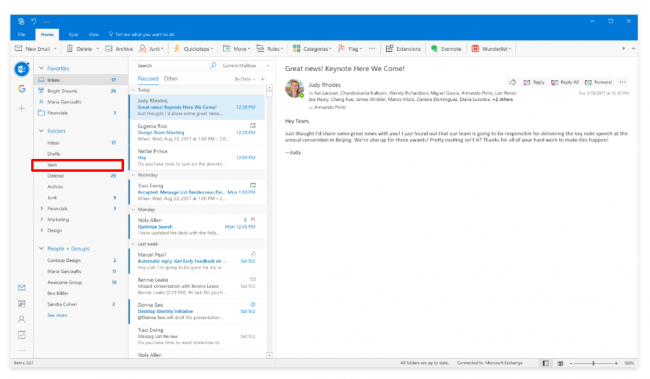
1. Choose the “Sent Items” folder in your Outlook folder pane

2. Select the message that you want to un-send. Make sure you double-click the message and open it. If the message simply appears as a “preview” in the reading pane, as seen above, you won’t be able to find this next step.

3. Under the Message section, select “Actions” and then “Recall This Message”

microsoft outlook reading pane, microsoft outlook message recall this message

NOTE: If you are not able to find the “Recall This Message” option, the feature may not be available within your organization. Those with a Microsoft Exchange account should be able to see this step.

4. After selecting “Recall This Message”, you’ll have two options:

  • Delete unread copies of this message
  • Delete unread copies and replace with a new message

Choose whichever option you prefer, and select if you would like to be notified if your recall is successful. Then select OK.

microsoft outlook recall this message

To compose a replacement message, simply type in the email body as you normally would and select “Send” when finished.

And voila! With those simple steps, you now know how to undo a sent email in Microsoft Outlook.

Prevent accidental emails even further with Email Data Loss Prevention (DLP)

Even with an undo send feature enabled, you can still miss the window to retract your email. And it happens – we’re only human.

With our Email DLP Suite, you can make sure no emails – especially those containing sensitive information – slip through the cracks.

Email DLP allows you to set customizable rules so no sensitive data gets sent accidentally or maliciously. Social security numbers, proprietary information, PHI, and more can be recognized and “quarantined” from being sent out until you give the final approval.

Accidents happen, and it’s always better to be safe than sorry.