Thursday, 11 January 2018

Jonathan Bush: Hopes for Digital Health – JPM Week 2018 (Exclusive Video)

Jonathan Bush - Hopes for Digital Health in 2018 - JPM Week, San Francisco - Paubox

  • 10,000 attendees and over 450 private & public companies attend.
  • We caught up with athenahealth CEO Jonathan Bush on Tuesday.
  • Jonathan was excited to hear we’d recently been accepted into the athenahealth Marketplace.

The 36th Annual JP Morgan Healthcare Conference went down this week in our backyard of San Francisco.

Otherwise known as JPM Week, it’s an opportune time to get out and network amongst our peers in the Health Care industry.

Jonathan Bush: Hopes for Digital Health in 2018

We caught up with athenahealth CEO Jonathan Bush on Tuesday night.

Here’s the transcript from our conversation:

Hoala Greevy: What’s your biggest hope for digital health in 2018?

Jonathan Bush: My biggest hope for digital health in 2018 is that the root platforming of the old world EMR space will reach a tipping point. And there will be a blossoming of companies like yours, that build new apps on top of old world data.

Hoala Greevy: That’s fantastic.

Jonathan Bush: And I think it’s gonna be 2018. Maybe towards the end, but I really think it’s gonna happen.

athenhealth Marketplace

The athenahealth Marketplace is the online destination where health care providers can explore innovative technologies that connect with athenaNet. We’re excited to say we recently got accepted into it.

Here’s our athenahealth Marketplace health care provider listing.

athenahealth MDP Conference

I first met Jonathan in person last September at athenahealth’s 7th Annual More Disruption Please (MDP) conference.

I compiled a few key takeaways from Jonathan’s keynote address here:

athenahealth MDP 2017: Jonathan Bush Keynote Address

Wednesday, 10 January 2018

This is Why Ransomware Attacks Are So Effective (New Data + Trends)

ransomware, ransomware attacks, ransomware attacks 2017

In 2017, ransomware cyberattacks became a serious, recurring threat for businesses, especially in the healthcare industry. Cybercriminals are getting smarter and more sophisticated, and the margin for human error is increasing.

As 2018 begins, what can we do to combat this threat? To defeat this enemy, we must know the enemy.

In this report, we are going to break down the anatomy of a ransomware attack, the ransomware trends we saw in 2017, and what we believe the ransomware trend forecast will be in 2018.

The Anatomy of a Ransomware Attack
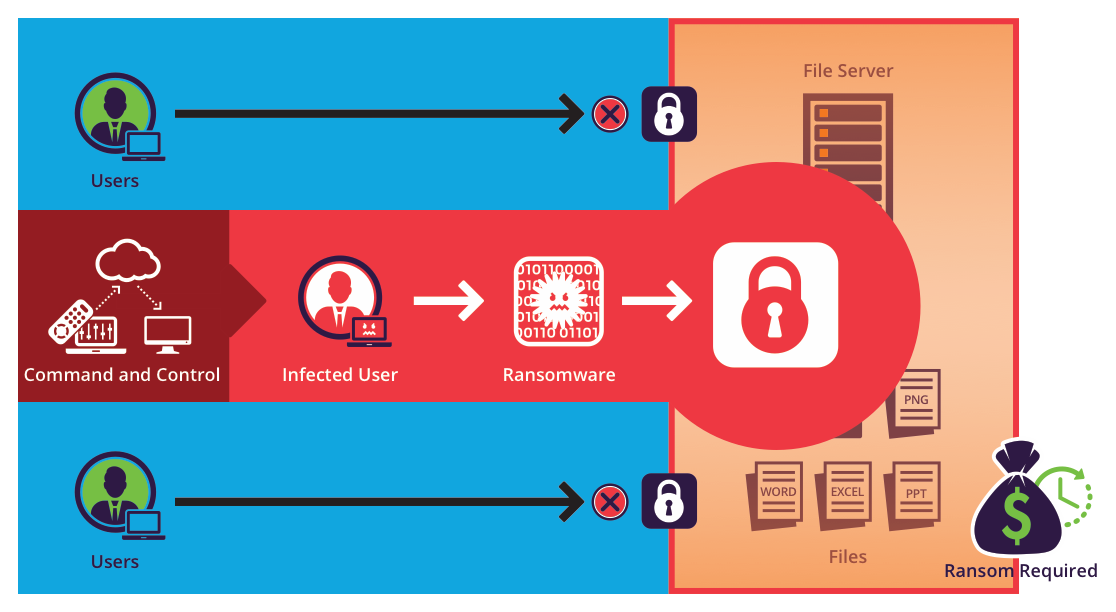
Why is ransomware so effective?

Ransomware is when an intruder gains access to your computer, encrypts important files with a private key, and demands a ransom to decrypt the information.

Email is the number one attack vector for ransomware (otherwise known as phishing), but ransomware comes in many shapes and sizes.

People continually fall victim to ransomware attacks because of human error like our susceptibility and The Overconfidence Dilemma. 

There are other ways for ransomware to affect software, such as network servers, but email remains as the top three causes of this kind of data breach.

Furthermore, as we saw from the June 2017 Ukraine cyberattacks, ransomware’s reach is worldwide. Soon after Ukraine’s attacks, similar Petya malware infections were reported in France, Germany, Italy, Poland, Russia, United Kingdom, the United States and Australia.

The international infection prompted the Ukrainian government to make an official announcement stating that the attacks had been halted. This event raised ransomware’s threat level to a worldwide epidemic. 

When ransomware strikes

Modern ransomware no longer needs to write itself into a disk to take effect. Today’s ransomware attacks execute in memory and do their work in memory.

Even if you disallow your users to install programs onto our Windows computer, you can still fall victim to other hacking tools. For example, hackers can execute advanced phishing campaigns using LinkedIn.

What to do after a ransomware attack

If you are infected by ransomware, you have three options (or sometimes four):

  1. You can get rid of your infected computers
  2. You can restore from a backup
  3. If you don’t have backups, then you pay the amount on the ransom note
  4. Or if you automate everything, you can rebuild everything from scripts. (This is a possible solution, but it is a lot more work to do.)

Sometimes, after you pay the ransom payments, the cybercriminals will give you a decryption key to get your data back. Other times, they won’t.

Sometimes, they’ll even return to hit you again the following week. Ransomware attacks can be unpredictable.

Ransomware Trends in 2017

Email breaches are increasing

According to Statista, roughly 269 billion emails were sent and received each day in 2017. As a result, it comes as no surprise that email is a preferred target for cybercriminals.

The threat of email breaches has risen considerably from 2016 to 2017. In fact, email was the biggest source of data breaches in 2017, with 73 breaches occurring between Jan. 1 and the end of November reported to HHS, affecting 573,698 people.

Ransomware doesn’t only affect those in healthcare. It can virtually affect any industry, such as when Uber allegedly paid a $100,000 ransom to hackers and Spanish telecoms giant Telefonica paid hackers $550,000 in Bitcoin.

But healthcare is especially targeted with more than 4,000 new ransomware attacks daily due to the black market value of protected health information (PHI) transmitted every day.

For instance, on August 28, 2017, the Lukitus Campaign sent out 23 million emails in 24 hours. Researchers determined that the emails sent out in the attack were “extremely vague,” with subjects lines such as “please print,” “documents,” “images,” “photos,” “pictures,” and “scans” to convince victims into infecting themselves with Locky ransomware.

The recurrence of ransomware led the HHS to release a guidance on ransomware in 2016. In 2017, the HHS had to reiterate the OCR Ransomware Guidance following more recent attacks such as the WannaCry attack.

As a result, it should come as no surprise that ransomware in the form of email breaches will continue to multiply in 2018.

HIPAA fines are rising

According to the HHS, “The HIPAA Security Rule requires implementation of security measures that can help prevent the introduction of malware, including ransomware.” Failure to do so constitutes a HIPAA violation, which is closely followed by a fine.

Anthem paid a $115 million fine for a single breach that happened in 2015, which earned a record for the largest fine ever issued by the HHS.

But the costly fine was appropriate, considering the breach affected 80 million Americans in 2015. PHI like social security numbers, birth dates, health conditions, and more were breached.

In contrast, 2016’s total HIPAA fines amounted to $23 million.

One fine alone in 2017 equaled five times more than the total amount of fines in 2016.

With the surplus of ransomware attacks due to insufficient security and staff training, we expect these fines to increase.

Ransomware payments are decreasing

In 2016, 48% of every organization in the United States had either been breached or suffered a kind of ransomware attack – that they know about.

But while ransomware attacks have increased, the amount of payment demanded per breach has dramatically decreased.

For example, in 2016, Hollywood Presbyterian Medical Center paid a $17,000 ransom in bitcoin to a hacker when their computers were hacked on Feb 5.

Now, with recent ransomware variants such as WannaCry ransomware and Bad Rabbit, the ransom price has gone down to an average cost of $544, according to Symantec’s Ransomware 2017 report.

With the threat of effective ransomware like WannaCry and Petya, one would think that the cost would drastically increase. However, we believe cybercriminals are operating with the mindset of charging a ransom that most people would pay, but hitting more people to extract more money.

This immoral business model seems to be the most profitable for cybercriminals. In 2016, ransomware cybercriminals took in about $1 billion last year based on money coming into ransomware-related Bitcoin wallets.

Ransomware will continue to grow over the next few years

The Cisco 2017 Annual Cybersecurity Report believes ransomware will be growing at a yearly rate of 350%.

The 2016 Cybercrime Report from Cybersecurity Ventures predicts cybercrime will cost the world in excess of $6 trillion annually by 2021, making it more profitable than the global trade of all major illegal drugs combined.

Due to the amount of ransomware attacks in U.S. healthcare, the HHS has issued a new stance in ransomware. Whether you pay the ransom or not, or restore from backup, or destroy the machine, the HHS defines the ransomware as a breach that must be reported.

Back in 1999, ransomware was spread through malware such as viruses.

Today, in 2018, cybercriminals have become more sophisticated and sneakier.

These criminals utilize macros in email attachments for office documents to release their ransomware. (Remember the Google Doc phishing scam that happened back in May 2017?)

Ransomware thrives on human error

A 2017 study from the University of Texas at San Antonio, titled “The Overconfidence Dilemma”, found that the average internet user’s ability to detect scams is believed to be a lot higher than it actually is.

For instance, the average internet user still thinks all the threats are from Nigerian princes with bad spelling.

Unfortunately, that’s not the case anymore.

As we saw with the Google Doc phishing scam, there were no obvious spelling or grammar errors, the logo was convincing, and the HTML was well done. Most untrained eyes would believe they opened a legitimate email.

Macro use in modern businesses

In a Microsoft Office document, you can embed a macro to automate certain tasks for you. For example, you can add a pre-designed table to a Word document, or add a sophisticated calculation to an Excel sheet.

As handy as macros can be, cybercriminals were quick to exploit it, launching a series of macro malware to unsuspecting consumers.

Hackers adopted macros and embedded powershell job script demands to make the infected computer perform certain tasks. There are even more advanced threats out there that hack the computer from PDF documents.  

In the early 2000s, security researchers saw a trend where executables were being delivered via email. As a result, the Internet blocked executables. This has continued to happen to this day.

Soon, we believe that a discussion will arise about whether the same is true for macros. Will they eventually become obsolete, like their predecessor executables?

Macros, especially in Excel documents, have a useful business purpose to them. As a result, businesses are more reluctant to give them up.

While that is understandable, at Paubox, we believe that macros are bad for email because the security risks outweigh the benefits.

Anti-Viruses battle against ransomware

Symantec, Norton, McAfee – we all know the big antivirus security firms. But how does antivirus software work?

Typically, an antivirus software will have a file with several hashes in them. Hashing is the transformation of a string of characters into a shorter fixed-length value or key that represents the original string. This is done to index and retrieve items in a database faster.

Each hash in antivirus software identifies a signature that each known virus or ransomware displays.

In the past, you would have this software installed on your computer or network server. Every 30 minutes or an hour, the software would run and check for any signatures or new threats.

If a new signature is found, the software takes the signature and distributes it to workstations or downloads it to a workstation.

You can amplify your antivirus software to check your large files as well, doing it as often as every minute to protect every machine against ransomware. However, this puts a significant load on the antivirus vendor.

The average lifetime of a ransomware signature, such as Cerber, is gone in 15 seconds.

99% of all ransomware on the internet changes its hash before one minute is up.

Even if your antivirus software could check every minute, you would still be two seconds too late.

And if you are too late and subsequently infected, it would take 33 employee hours to recover from a ransomware attack.

This is why ransomware is working. There’s a new threat level landscape, and the old income players have not adapted quick enough to take advantage of the new information out there.  

How do we stop ransomware?

Start building data sets

If you are using software, odds are you are in the Cloud using AWS, Azure, or Google as your vendor. These cloud vendors often provide machine learning and AI so you don’t need to reinvent the wheel.

What you do need are data sets.

In email encryption, we need data sets that distinguish the good macros from the bad macros. Over time, if you build a big enough data set, you can get predictable, sharp results so that you don’t have to rely on signatures that don’t keep up with the modern attack vector.

Look at domain ages

Another way to protect against Ransomware attacks is with something we built into Paubox. We call it “Domain Age”.

For example, if you receive an email or a link in an email to a domain name that has been around for 10 days, the link or email is most likely not legitimate.

For every link and email address domain that is sent to our customers, Paubox’s spam filtering checks to see if the link or email has been around for a sufficient amount of time. If not, we determine that the email is bogus with bad intentions and prevent it from delivering to the inbox.

This security check is important considering how easy it is to register domain names these days. You can even register domain names with scripts.

You can also buy 50 domain names in 10 minutes. What legitimate purpose is there to need that many domain names? We don’t think there’s any, yet it is still allowed.

We think there should be a lot more verification in place when purchasing a domain name. For example, there is nothing stopping you from buying “wellsfargoincalifornia.com” or “wellsfargoinnortherncalifornia.org”, or simply replacing an “e” with a “3”, and so on.

Host phishing competitions

Phishing competitions are good exercise for large companies.

Simply launch a minor phishing attack to determine who the gullible users in your company are.

Alternatively, your IT team can try and phish the CTO to see if your director of security experts can be fooled.

Not only is this a good team building exercise, but it can improve user education for your staff.

Ransomware Trend Forecast for 2018

With all this in mind, these are the three we believe will continue to prevail in 2018.

Email remains top dog

We believe email will remain the top dog for the attack vectors of ransomware.

Why? Because email is still the weakest link, and cybercriminals are getting smarter.

We’ve seen cybercriminals target high-profile figures, such as when the personal Gmail account of John Podesta, a former White House chief of staff and the chairman of Hillary Clinton’s 2016 U.S. presidential campaign, was compromised in a data breach.

He thought he had received a password change request from Gmail on his iPhone, but in reality, he fell victim to a spear-phishing attack launched by the hacking group Fancy Bear (who were allegedly affiliated with Russian intelligence services).

Podesta complied with the phishing email and changed his password at 4AM. This gave the hacking group direct access to his personal Gmail account.

Podesta’s email data breach is a perfect example of human error. After all, who is paying attention at 4 in the morning?

Portals continue to suck

From an email encryption standpoint, portals will continue to suck.

At Paubox, we built our solution to get rid of portals. We deliver the email encrypted, straight to the inbox, without any friction. This is because we believe user experience for email encryption is just as important as the military grade security.

In 2017, we learned that 79% of people use their smartphone to read emails. But retrieving an email from a portal on a mobile device is even worse than trying to access an email in a portal on your desktop.

Ultimately, portals are not the way to go. People don’t want to deal with portals on a small screen because the user interface is terrible.

“Don’t make me login to one more portal. Please.” – An actual quote we’ve heard from a portal user.

Ample market opportunity

We believe there is ample market opportunity in encrypted email and the encrypted security space.

We know healthcare needs help safeguarding their information from all sorts of prying eyes – whether it be protection from a cybercriminal or a disgruntled former employee.

Ransomware is a worldwide epidemic with security teams constantly looking out for new infections. As such, organizations – especially in healthcare – need to get ahead of ransomware to reduce its threat.

With a strong email encryption solution like Paubox, you can do just that. Not only is Paubox the easiest way to send and receive HIPAA compliant email, it also includes robust SPAM filtering that identifies malware and phishing attacks and has protocols against Ransomware.

See for yourself how easy email encryption can be with a free no-risk 14 day trial.

Try Paubox for FREE and make your email HIPAA compliant today.

Monday, 8 January 2018

Can I use Wix Email and be HIPAA Compliant?

Can I use Wix Email and be HIPAA Compliant? - Paubox

Last week we received a useful inbound inquiry from a Behavioral Health System in South Carolina.

In a nutshell, they asked that since their website was already hosted by Wix, they could also use Wix email for HIPAA compliant email.

We thought the answer to this would be great content for a blog post.

We know the HIPAA industry is vast so we can empathize with just how many people need to use cloud-based services in this sector.

In previous posts, we’ve covered the following cloud solutions and their capabilities for HIPAA compliance:

Today, we will determine if Wix offers HIPAA compliant email or not.

SEE ALSO: HIPAA Breaches and Cloud Providers

About Wix

Wix is a cloud-based web development platform that was first developed and popularized by the Israeli company also called Wix.

The company allows users to create HTML5 web sites through the use of easy to use drag and drop tools.

Wix and the Business Associate Agreement

We’ve previously talked about how a Business Associate Agreement (BAA) is a written contract between a Covered Entity and a Business Associate. It is required by law for HIPAA compliance.

We checked Wix’s site and found their Terms of Use, Privacy Policy, and Help Center pages.

We were unable however, to find any mention of HIPAA, Protected Health Information, or Business Associate Agreement on those pages.

We therefore conclude that Wix itself is not a HIPAA compliant vendor.

Wix and G Suite

During our research, we also found a page called Personalized Email Address and Mailbox.

On it, Wix says:

Wix offers Mailboxes with G Suite by Google Cloud.

From what we could gather, it appears Wix solely resells G Suite as their hosted email provider.

To learn more about their partner relationship with Google, we next found a Wix page called Google Mailing Application – Customer Agreement.

The Agreement clearly states:

The Service is provided, maintained and operated by Google and not by Wix.

And also:

The use of the App is subject to the standard Terms of Service of Google and the G Suite Acceptable Use Policy (together the “Google TOS”).

And lastly:

You acknowledge that Google is responsible for the provision of the Service to you. Wix shall have no responsibility or liability in relation to the provision of the Service by Google, the quality or functionality of the Service, its availability, the support services provided by Google and/or any other aspect of the Service or its provision to you other than Wix’s responsibility in relation to the technical billing actions conducted by Wix on behalf of Google.

From these statements, we can see Wix outsources their email hosting to Google and that Google assumes responsibility for it.

From a HIPAA compliant email standpoint, we’ve previously covered how to make G Suite HIPAA compliant. Since Wix partners with Google to provide email hosting, we recommend following that guide.

Does Wix Offer HIPAA Compliant Email?

The Business Associate Agreement is a key component to HIPAA compliance between a Covered Entity and a Business Associate.

We it comes to Wix and their email platform, we discovered:

  • Wix does not offer to sign a BAA with its customers.
  • Wix partners with Google G Suite for email hosting.
  • Google assumes full responsibility for its email platform.
  • While Google is willing to sign a BAA for G Suite, it does not actually cover email sent and received in transit.

Conclusion

If you are purchasing Wix email via their G Suite partnership, you can follow our guide on how to make it HIPAA compliant.

Thursday, 4 January 2018

Is WordPress HIPAA Compliant?

Is WordPress HIPAA Compliant? - Paubox
Can I use WordPress and be HIPAA Compliant?


  • There are several definitions of WordPress.
  • WordPress is a very popular open source Content Management System (CMS).
  • WordPress.com is the commercially available version of WordPress CMS.

Lately, we’ve been discussing in the office whether certain cloud solutions are HIPAA compliant or not. WordPress is both a popular open source Content Management System (CMS) and a commercially available hosting platform.

We know the HIPAA industry is vast so we can empathize with just how many people need to use cloud-based services in this sector.

In previous posts, we’ve covered the following cloud solutions and their capabilities for HIPAA compliance:

Today, we will determine if WordPress offers HIPAA compliance or not.

SEE ALSO: HIPAA Breaches and Cloud Providers

About WordPress

WordPress is a free and open source Content Management System (CMS) based on PHP and MySQL. It’s such a popular CMS that it reportedly powers 29% of the internet (including this blog). It can be downloaded for free at WordPress.org.

There is also a commercially available version, which is found at WordPress.com. WordPress.com is targeted towards organizations that don’t want to install, configure and maintain WordPress on their own infrastructure.

WordPress and the Business Associate Agreement

We’ve previously talked about how a Business Associate Agreement (BAA) is a written contract between a Covered Entity and a Business Associate. It is required by law for HIPAA compliance.

Since there are two distinct variations of WordPress, we’ll look at each one on its own for HIPAA compliance.

WordPress.org and the BAA

As previously mentioned, WordPress can be downloaded for free at WordPress.org.

If this is the variation of WordPress you intend to use for HIPAA compliance, there are several added things to consider:

  • Will the WordPress server reside on premises in your office or corporate datacenter?
  • Will the WordPress server be hosted in the cloud?

If the WordPress server will reside on premises or in your datacenter, you’ll need to configure that server to meet HIPAA compliance standards. The methods to do that involve a multitude of factors that are outside the scope of this post.

If the WordPress server will be hosted in the cloud and you will be storing Protected Health Information on it, you’ll need to select a HIPAA compliant website provider who will sign a BAA with you.

We recommend looking at providers like Atlantic.net or Medstack for HIPAA compliant WordPress hosting.

SEE RELATED: How to Make Sure You Have a HIPAA Compliant Website

WordPress.com and the BAA

WordPress.com, which is run by Automattic Inc, is the commercially available version of WordPress.

We checked the WordPress.com Terms of Service and Privacy Policy pages for any signs of Automattic’s ability to sign a BAA.

In both cases, we were unable to find any mention of HIPAA, Protected Health Information, or Business Associate Agreement.

We therefore conclude that WordPress.com is not a HIPAA compliant vendor.

Does WordPress Offer HIPAA Compliant Service?

The Business Associate Agreement is a key component to HIPAA compliance between a Covered Entity and a Business Associate.

Since there are two variations of WordPress, we researched each one for its HIPAA compliance capabilities.

Conclusion

If you installed the open source version of WordPress on your own server:

  • You need to verify your internal infrastructure and configuration are HIPAA compliant.

If you are using a third party HIPAA compliant WordPress hosting vendor:

  • Make sure to sign a BAA with them.

If you are using WordPress.com by Automattic:

  • Do not store PHI on it because Automattic will not sign a BAA with your organization.

HIPAA Violations Can Bankrupt Your Business – Learning from 21CO’s $2.3M Fine

21st Century Oncology, Inc. (21CO), a provider of cancer care services and radiation oncology, has agreed to pay a $2.3 million fine to the HHS after compromising the PHI of over 2 million patients. They must also adopt a thorough corrective action plan to settle any potential HIPAA violations in the future.

The organization agreed to pay the costly penalty in lieu of facing potential civil money penalties.

For large corporations, paying a $2.3 million fine is feasible. But if you’re a small business, a $2.3 million fine could not only break the bank, but put you out of business as well.

Learning from 21st Century Oncology

21CO was notified twice by the FBI about patient information being illegally obtained by an unauthorized third party. The FBI proved the security issue by revealing 21CO patient files purchased by an FBI informant.

During an internal investigation, 21CO determined that the unauthorized user had accessed 21CO’s network SQL database, with access beginning as early as October 3, 2015. The attacker used a remote desktop protocol from an exchange server within 21CO’s network to enter the SQL database.

21CO determined that 2,213,597 individuals were affected by this data breach, with the attacker having access to sensitive PHI such as their names, social security numbers, physicians’ names, diagnoses, treatment, and insurance information.

In its own investigation, the OCR noted that 21CO failed to:

  • conduct an accurate and thorough assessment of the potential risks and vulnerabilities to the confidentiality, integrity, and availability of the electronic protected health information (ePHI)
  • implement security measures sufficient to reduce risks and vulnerabilities to a reasonable and appropriate level
  • implement procedures to regularly review records of information system activity, such as audit logs, access reports, and security incident tracking reports
  • prevent disclosing protected health information (PHI) to third party vendors without a written business associate agreement

Along with paying the hefty $2.3 million settlement, 21CO must abide by a corrective action plan established by the OCR. The corrective action plan requires 21CO to:

  • complete a risk analysis and risk management plan
  • revise policies and procedures
  • educate its workforce on policies and procedures
  • provide all maintained business associate agreements to OCR
  • submit an internal monitoring plan

21st Century Oncology files for bankruptcy 

21CO operates and manages 179 treatment centers, including 143 centers located in 17 states and 36 centers located in seven countries in Latin America.

But despite being a large corporation, the $2.3 million settlement with the OCR devastated the organization’s finances. Yet, they were still able to afford a move to keep their business running.

On May 25, 2017, 21CO filed for Chapter 11 bankruptcy protection in the United States Bankruptcy Court for the Southern District of New York.

Chapter 11 bankruptcy allows 21CO to reorganize debts in order to regain profitability. Although there’s an avenue for small businesses to also file for Chapter 11, often those filings get changed to Chapter 7 bankruptcy which results in liquidation of assets and the closing down of the business.

HIPAA violations can bankrupt small businesses

Considering that the PHI of over 2 million individuals was compromised by 21CO’s insufficient security measures, the $2.3 million fine is fitting. But even for a small medical practice with less patients, HIPAA violation fines can be merciless.

You may think, “What are the odds of receiving a HIPAA violation when the HHS have bigger fish to fry?” But often times, the HHS will receive a complaint from a patient that results in a full-scale investigation of your practice.

While the initial complaint could be about something small, the HHS can find more violations during their investigation. That’s exactly what happened Phoenix Cardiac Surgery, P.C..

The HHS investigated the small practice after they received a complaint from a patient about the use of online calendars. The clinic’s staff had been posting clinical and surgical appointments on a publicly accessible calendar.

Upon concluding their investigation into Phoenix Cardiac Surgery, the HHS found four other HIPAA violations along with the initial complaint. This resulted in a $100,000 settlement with the OCR.

You can avoid drastic fines like these with Paubox’s HIPAA compliant email. We encrypt all emails by default to eliminate accidentally sending PHI without encryption and prevent data breaches – both of which are common HIPAA violations.

When facing costly HIPAA violation settlements, it’s always better to be safe than sorry.

Try Paubox for FREE and make your email HIPAA compliant today.

Wednesday, 3 January 2018

G Suite with BAA vs Paubox

G Suite with BAA vs Paubox


  • The G Suite Business Associate Agreement (BAA) does not actually cover email sent and received in transit.
  • G Suite needs an additional service like Paubox to be completely secure for HIPAA Compliant Email.
  • Paubox can integrate with G Suite in under 30 minutes.

This week we received a useful inbound inquiry from a Health System in Columbia, Missouri.

In a nutshell, they inquired whether the Business Associate Agreement they have with Google and their G Suite implementation was sufficient for HIPAA compliant email.

Since we get this question a lot, we thought it would be great content for a blog post.

Here’s what they sent:


Dear Paubox,

I already have paid gmail (precisely G suite) and google signed BAA with us. But I’m finding your product very attractive.

Is there any thing Paubox brings beyond what I described above?

Thank you and have a great day!


Essentially, we felt the answer to this would be helpful for others looking to learn more about Paubox and how it compliments G Suite.

The objective of this post is to clarify how Paubox integrates and adds value to G Suite.

SEE ALSO: How to Make Gmail HIPAA Compliant

The Google Business Associate Agreement (BAA) for G Suite

As we’ve previously covered, the Business Associate Agreement (BAA) is a written contract between a Covered Entity and a Business Associate. HIPAA compliance requires a BAA by law to ensure security and privacy.

We checked Google’s site and found a G Suite Administrator Help article called HIPAA Compliance with G Suite.

In the article, Google points out:

“Google offers a BAA covering Gmail, Google Calendar, Google Drive (including Docs, Sheets, Slides, and Forms), Google Hangouts (chat messaging feature only), Hangouts Meet, Google Keep, Google Cloud Search, Google Sites, Jamboard, and Google Vault services.”

READ MORE: Can I use G Suite (Google Apps) and be HIPAA Compliant?

However, it’s important to note that:

  • You must sign a BAA with Google. It is not included by default.
  • Google’s BAA does not cover email sent or received in transit.

How Paubox Adds Value to G Suite

Unlike G Suite, Paubox sends encrypted emails to any recipient, regardless if their email provider supports encryption or not. ​

This is because Paubox sends encrypted emails by default.

Every other email encryption provider requires email senders to be experts in identifying what qualifies as Protected Health Information and manually encrypt each individual email and attachment. However, this method leaves your organization vulnerable to HIPAA violations due to human error.

Humans aren’t perfect, and if people are overwhelmed with their workload already, it is unrealistic to expect them to encrypt specific emails every time. This often results in emails containing PHI being sent without encryption, which qualifies as a data breach and a HIPAA violation.

RELATED: How to Encrypt Your Gmail Email (With Pictures)

With Paubox, we offer an easier and more secure way to send encrypted emails. And the best part? Our integration with G Suite is so seamless, you won’t notice any change in your email behavior.

Paubox eliminates the need to press any extra buttons or write “secure” in the subject line when sending encrypted emails. Simply compose an email as you normally would, and Paubox takes care of the rest.

By encrypting everything you send out by default, Paubox can ensure HIPAA compliance for your organization while making the experience for your recipients to view and reply to one of your encrypted emails extremely user friendly.

Get Started with Paubox for G Suite

While G Suite offers a number of useful applications such as Google Calendar and Google Drive, Paubox provides military grade encryption features without the hassle of extra steps.

Paubox also includes security features such as robust SPAM filtering that identifies malware and phishing attacks and has protocols against ransomware.

Experience how easy email encryption can be with a free no-risk 14-day trial.

Try Paubox for FREE and make your email HIPAA compliant today.

Tuesday, 2 January 2018

HIPAA Breach Report for January 2018

hipaa breach reporting, hipaa breach, hipaa, reporting

The Paubox Breach Report analyzed HIPAA breach reporting submitted to the U.S. Department of Health & Human Services (HHS) in December to analyze the types of breaches of unsecured protected health information (PHI) affecting 500 or more people.

HIPAA Breaches Ranked by People Affected

Paubox HIPAA Breach Report: January 2018 - Breaches Ranked by People Affected

Top Three Breach Types

  • Network Server breaches ranked the highest with 71,759 people’s PHI hacked or stolen in December. Network Server returned to the top spot after having zero reported breaches the month prior.
  • Paper/Films breaches ranked second with PHI of 27,894 people breached.
  • Desktop Computer breaches came in a close third with 27,113 people having their PHI breached.

Bottom Three Breach Types

  • Laptop ranked as the lowest number of people’s PHI being breached in December with 2,250 breaches.
  • Other Portable Electronic Device breaches ranked second lowest at 8,745.
  • Other were the third lowest type of breach as ranked by people affected with 19,487.

HIPAA Breaches Ranked by Occurrence

Paubox HIPAA Breach Report: January 2018 - Breaches Ranked by Occurrence

The Most Common

  • Network Server ranked as the most common breach types in December with 7 reported breaches. This is a big jump from the month prior, where there were zero reported breaches of this type.
  • Paper/Films came in as the second most common breach type with 5 incidents.
  • Email came in third with 4 reported breaches.

The Least Common

  • Desktop Computer was the least common breach type with 1.
  • Laptop, Other and Other Portable Electronic Device rounded out the bottom with 2 breaches each.

Takeaways

Unfortunately, December was more in the “norm” for HIPAA breaches. Network Server took the top spot as both number of people affected and number of breach incidents.

Email remained in the top 3 category for breaches by occurrence.

Full Data

Click here to download the raw data.

About the Paubox HIPAA Breach Report

The Paubox HIPAA Breach Report analyzes breaches that affected 500 or more individuals as reported in the HHS Wall of Shame in December 2017.

Minimize the risk of email getting you on the list with Paubox Encrypted Email. Start your free trial today.